
What did this call cost?
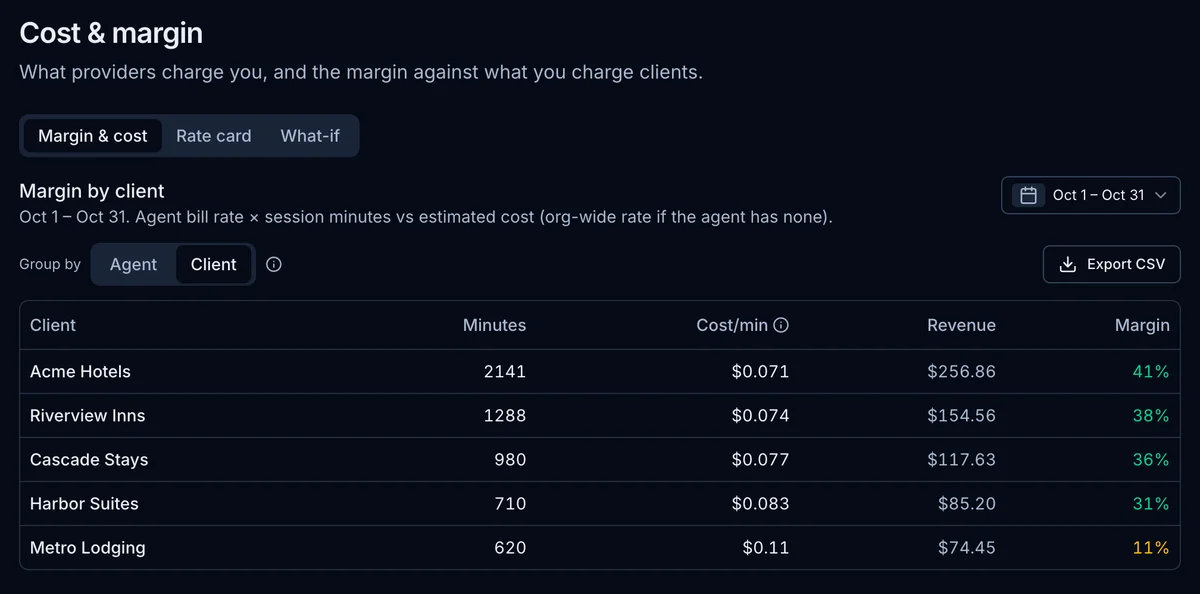
Every call priced across speech-to-text, the language model, and text-to-speech, with margin against what you charge.
Voice AI economics & observability
Parlot is a voice AI observability platform that shows the cost, quality, latency, and margin of every production voice agent call across speech-to-text, the language model, and text-to-speech. Add a few lines to your LiveKit, Pipecat, or LangGraph agent to start.
Already have an account? Sign in
The gap
Cost, outcomes, and a lasting record of every call—in one place.
Every call priced across speech-to-text, the language model, and text-to-speech, with margin against what you charge.
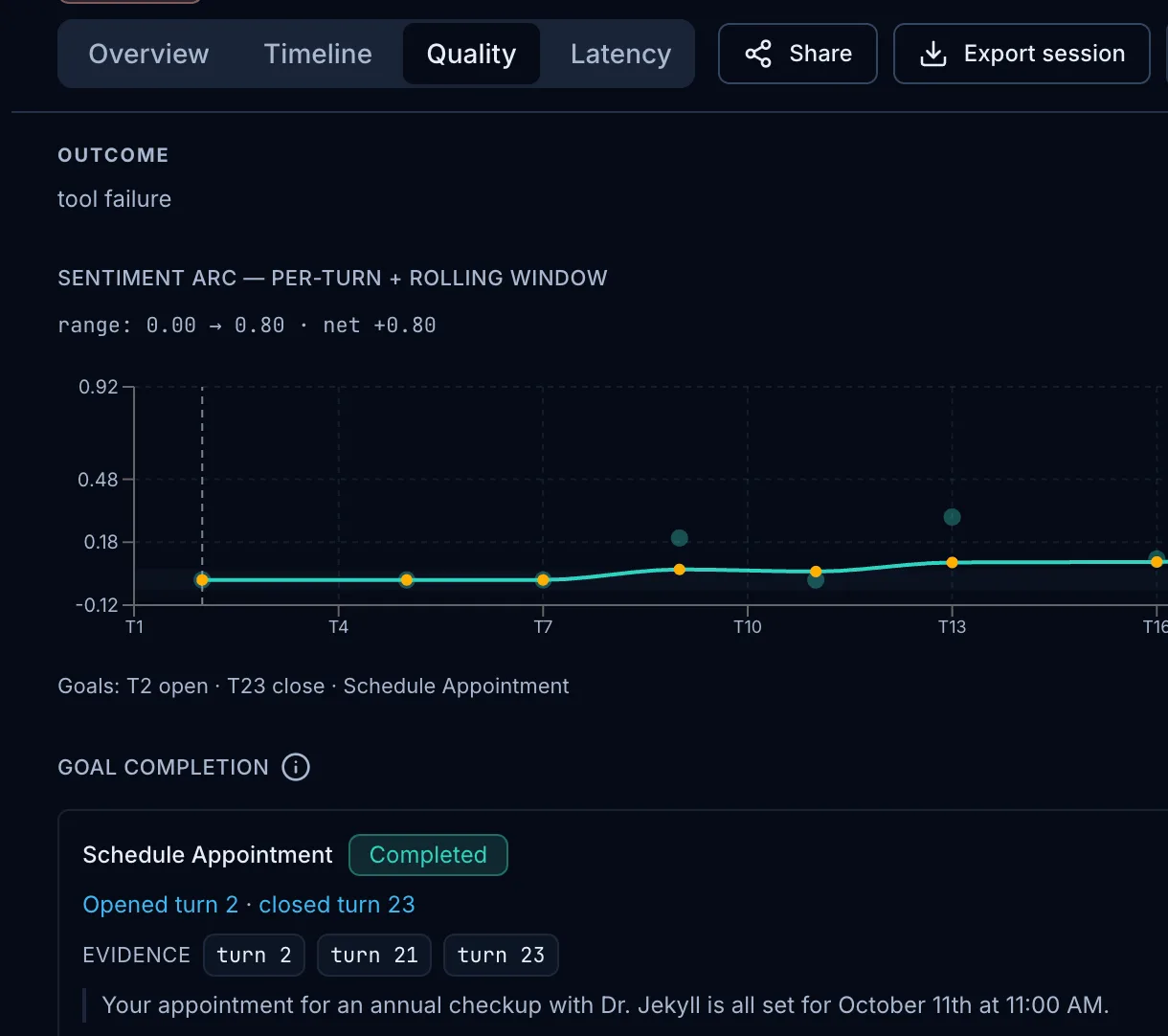
Score goals and call results, and see whether a stall came from the agent, the audio, or latency.
Your dashboard keeps sessions for as long as your plan retains them, with exports and share links.
What Parlot gives you
Built around voice turns: who spoke, when, and what each stage cost.
Cost
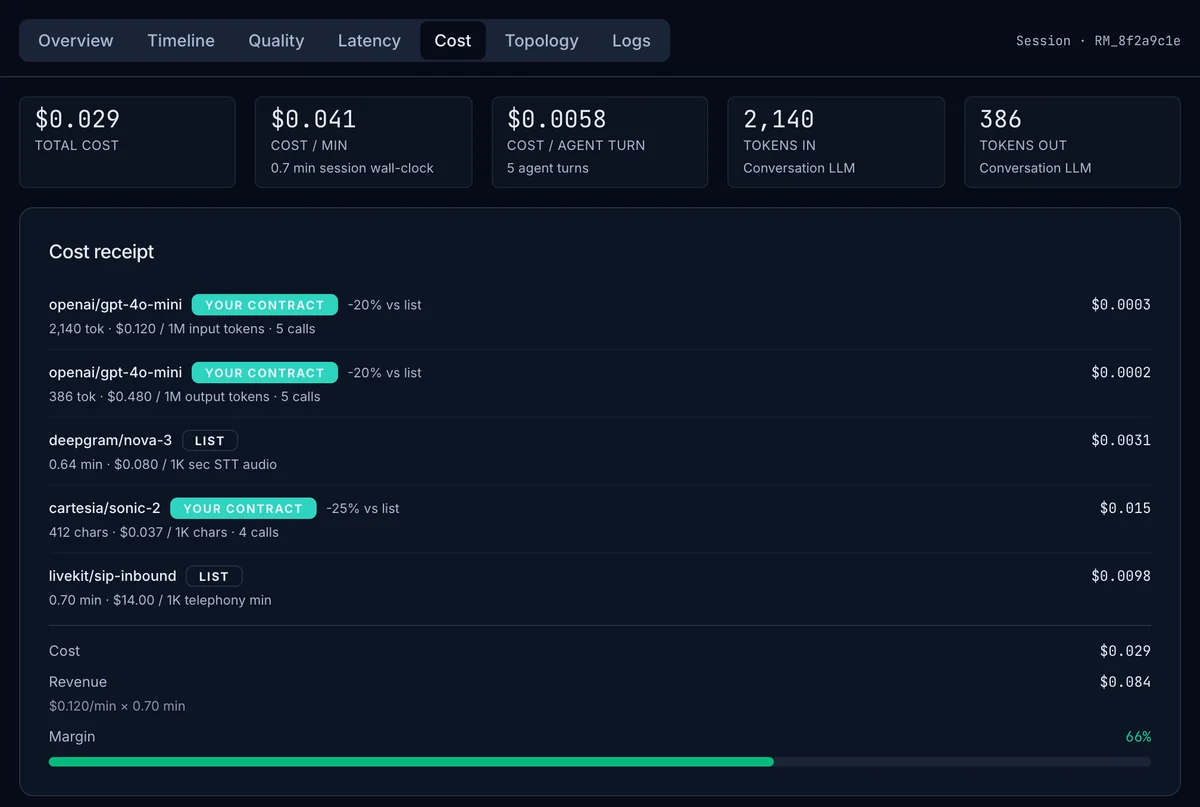
Itemized speech-to-text, language model, and text-to-speech receipts at your contract rates, then revenue and margin against what you charge.
What-if
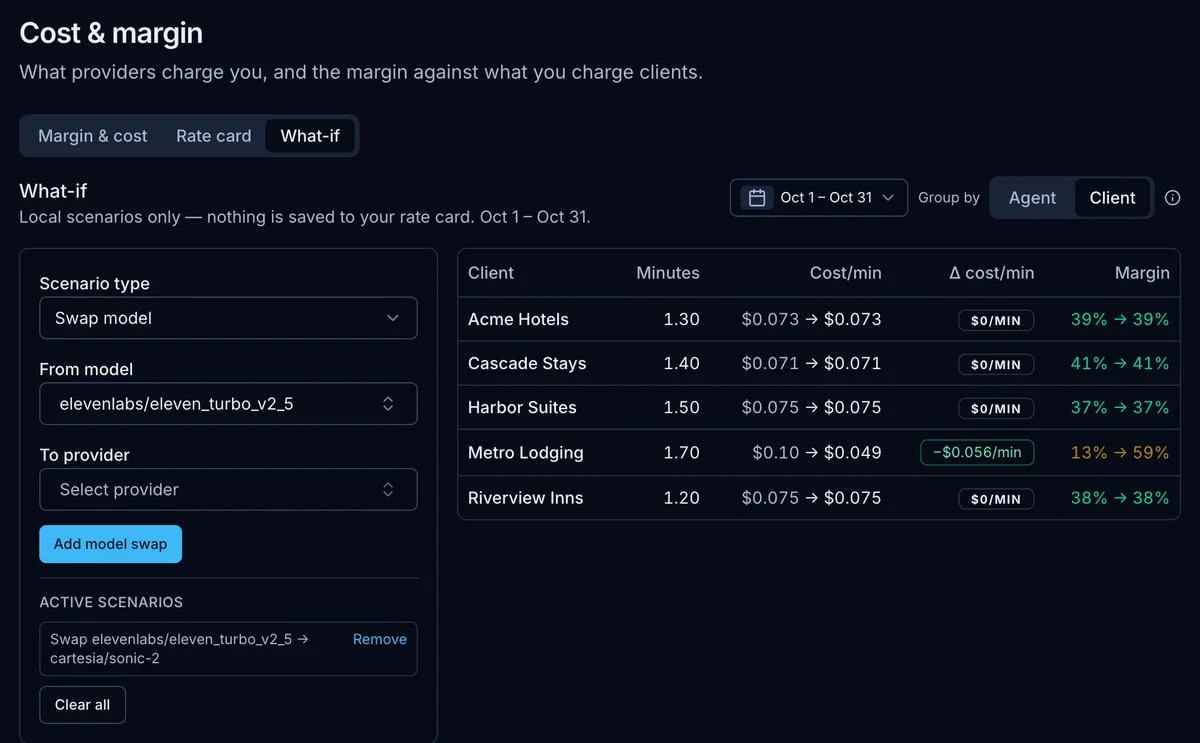
Try a local scenario: edit a rate, change the bill rate, or swap text-to-speech or the language model and compare cost per minute and margin by client before you change production.
Quality & Speed
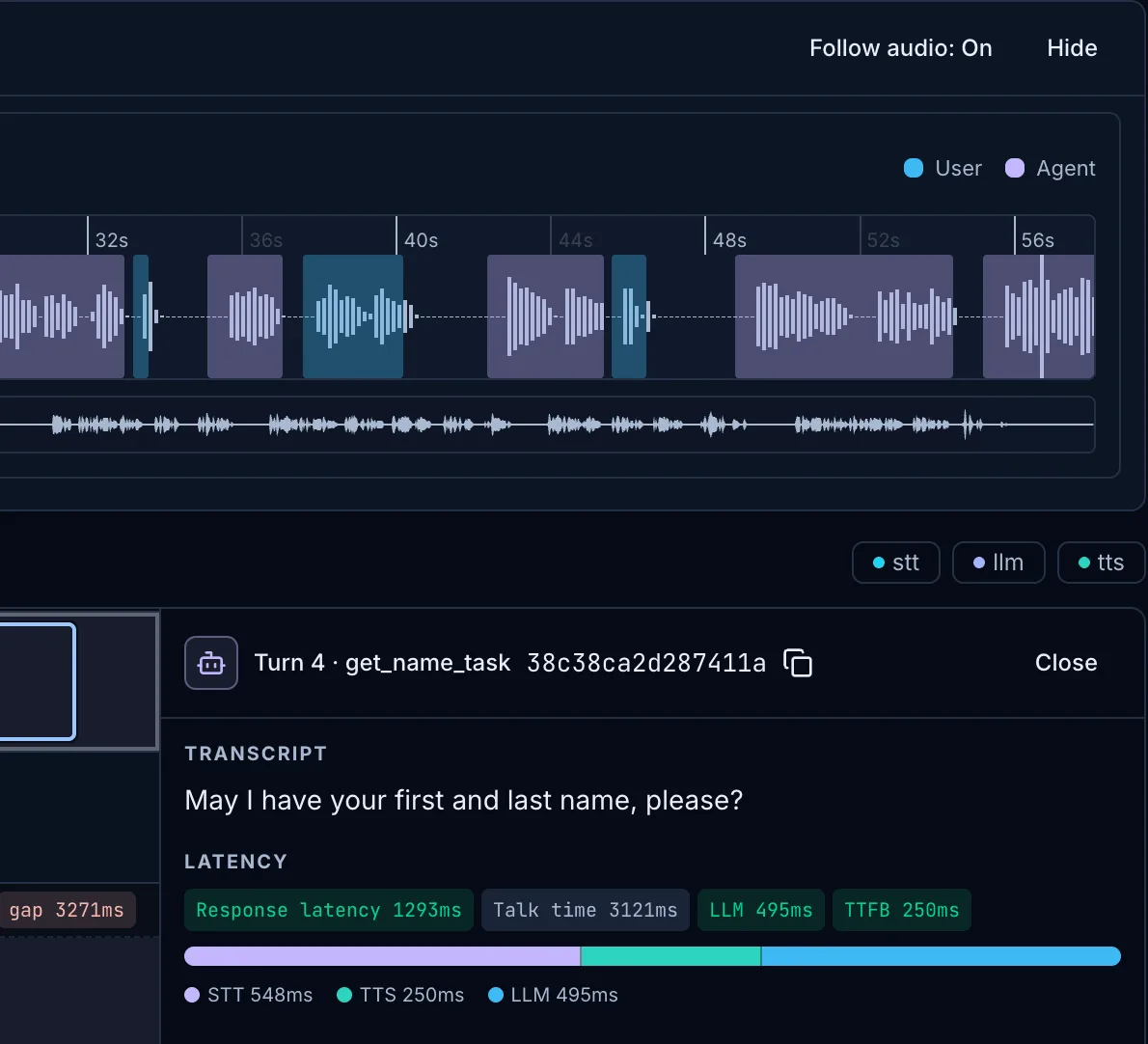
Outcomes and goals stay separate. Latency stacks, attention ranking, and turn timelines that understand interruptions and handoffs.
Topology
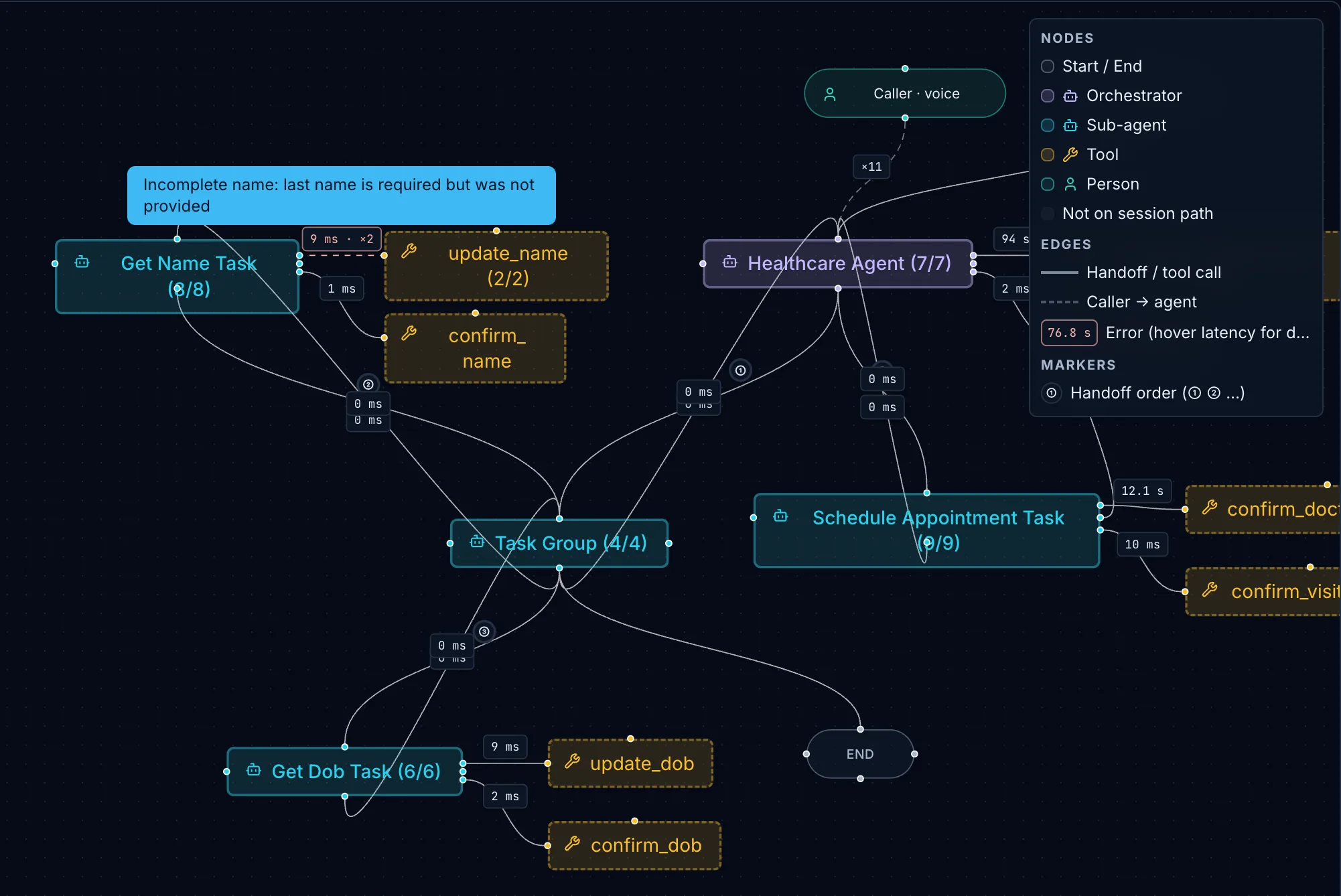
Follow the orchestrator, sub-agents, tools, and handoffs on one graph, with a marker on the step that failed. Multi-agent LiveKit and Pipecat sessions on one readable graph.
Your data
Sessions with summaries, async export, and share links, kept for as long as your plan retains them. Send analytics to a dashboard you own, on LiveKit Cloud or self-hosted media.
A few lines to add
Call parlotize() before you build the session, set the two environment variables below, and your first call shows up in minutes. Full steps in the Quick Start.
from livekit.agents import AgentSession, JobContext
from parlot.instrumentation.livekit import parlotize

parlotize("my-agent")


async def entrypoint(ctx: JobContext):
    await ctx.connect()

    session = AgentSession(...)
    await session.start(agent=..., room=ctx.room)
export PARLOT_ENDPOINT=https://ingest.parlot.ai
export PARLOT_API_KEY=<org-scoped-key>Your call data
Call audio, transcripts, and logs can include personal details, so each of these controls is in your hands.
Recording, session logs, and message bodies are on by default for new agents. Turn any of them off per agent in Settings or in parlotize().
Personally identifiable information (PII) redaction is on by default and masks transcripts and recordings. Redaction is best-effort, so review content before you export or share it.
Retention is 7 days on Free, 30 on Starter, 90 on Growth, and unlimited on Scale.
A few lines. Call parlotize("my-agent") before you build your session and set PARLOT_ENDPOINT and PARLOT_API_KEY. Parlot sends telemetry in the background, so your calls keep running on their own.
OpenTelemetry spans from your agent: turn transcripts, timings, token and usage counts, tool calls, and session logs, plus call audio when recording is on. Each capture type is on by default for new agents, and you can turn any of them off in Settings or with parlotize(). Personally identifiable information (PII) redaction masks transcripts and recordings by default.
LiveKit Agents, Pipecat, and LangGraph, through MIT-licensed open-source packages. All three share one session and turn model, so cost, quality, and topology views look the same across frameworks.
Yes. The instrumentation SDK is MIT, and the platform is source-available under the Business Source License 1.1, free for production use up to 4,000 turns per month. Above that, a commercial license applies.
A turn is one speaker exchange: the caller speaking, the agent replying, or a human rep stepping in, so a caller message plus an agent reply is two turns. Plans meter turns, which means call minutes and telemetry volume carry no extra charge.
Parlot prices LLM tokens, speech-to-text, text-to-speech, and phone minutes from the usage your agent reports. Rates start from public list prices, and a contract rate you enter for a model applies to new sessions. Add a bill rate per minute to see margin.
Sign up for a free account — 4,000 turns per month, no credit card. Upgrade to Starter, Growth, or Scale when you need more retention, evals, and seats.
LiveKit Cloud Insights keeps data for 30 days (per LiveKit’s docs, checked November 16, 2026). Parlot retention follows your plan (planned tiers run from 7 days on Free to unlimited on Scale) and adds dollar cost by stage and margin. Langfuse can ingest voice traces over OpenTelemetry, while Parlot adds voice cost, quality, and topology views.
Start free with 4,000 turns per month. Open-source SDK for LiveKit, Pipecat, and LangGraph. Add parlotize() and your first call shows up in minutes.